
What is Google Vids?
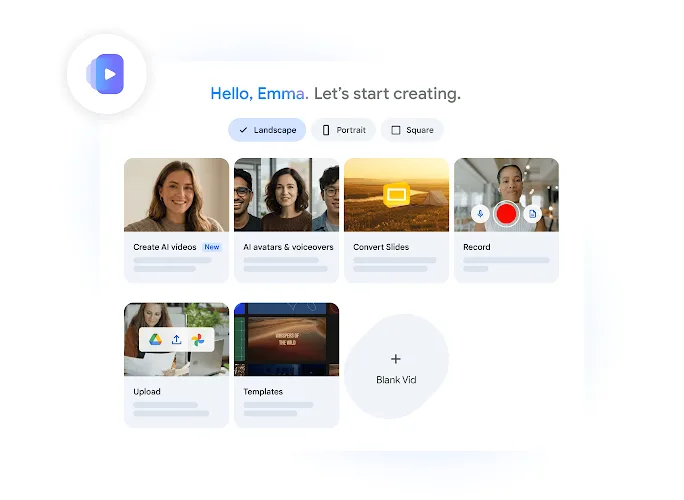
Google Vids primarily serves video storytelling in workplace scenarios, such as training, onboarding, product demonstrations, and sales presentations. Users can start from pre-designed templates, existing Slides, or screen recordings and audio, or they can upload media assets from Google Drive or Google Photos.
The official website introduces features such as generating prompts to create video clips, animating images, using AI digital avatars and voiceovers, and adjusting videos via text transcription just like editing a document. The collaboration feature lets team members view, comment on, or edit content, with sharing permissions customizable before publishing; videos exported to YouTube are set to “Unlisted” by default for review.
The current FAQ states that individual videos can be up to 30 minutes long and support landscape, portrait, and square aspect ratios; creation and editing are performed on the desktop, while viewing is available on both mobile and desktop. AI digital avatars and voiceover features support 24 languages, but multilingual transcription and subtitles require separate confirmation based on specific functionality—do not assume that each AI feature supports the same language range.
Key features
Templates and Slides to Video
Screen recording, audio recording, and asset import
Prompt generation of snippets and image animation
AI digital humans, voiceovers, and subtitles
Video editing based on text transcription
Collaboration permissions and sharing
Use cases and audience
Enterprise teams, trainers, and marketing and sales content creators
- Employee Onboarding and Training Videos
- Product explanation and sales demonstration
- Team Internal Communication and Multilingual Content
Tips, Slides, Images, Videos, Screen Recordings, and Audio Recordings
Collaboratively editable and shareable video projects
How to use
- 01
Log in to your Google account, select a template, Slides, or the recording entry to start your project.
- 02
Add your own assets, voiceovers, and subtitles, and use the AI features available to your current account to enhance your content.
- 03
Complete editing and verification on the desktop, then share after setting viewing or collaboration permissions.
Pricing and availability
2026-10-25 Google Vids’ official FAQ provides a free trial access for Google accounts; advanced features and higher usage are available for specific Workspace or Google AI plans. The exact plan amounts have not been verified, and advanced video generation, digital humans, or voiceover usage are not universally considered free.
- Pricing source
- https://workspace.google.com/products/vids/
- Pricing last updated
- 2026-10-25
Prices and limits may change. Check the official website for current terms.
Official website & sources
Updated on 2026-10-25


